Ionos vs Hostinger (2026): Reviewed and compared by an expert
Ionos and Hostinger are popular web hosting services that you’ll see mentioned frequently any time you research the subject. Lithuania-based Hostinger has been around since 2004, while the German firm, Ionos, enjoyed a rebrand in 2018 but has actually been around in some form since the late 1980s.
Both companies provide a range of services including web hosting, website building, WordPress hosting, and many different types of hosting such as VPS and dedicated servers. I’m focusing on standard web hosting here, with a brief look at what else is available. Here’s how I found my experience with each web hosting provider and how they compare.
Read more: These are the best VPN services in 2026
How I tested
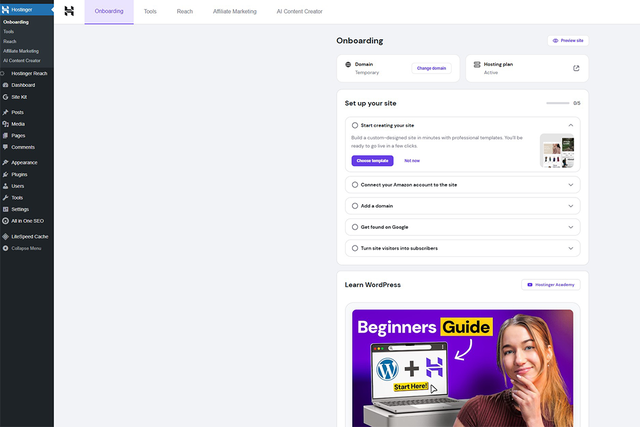
I used Ionos and Hostinger for 10 days each. I signed up for a standard web hosting account to see how easy the process was as well as what was involved. I then used both accounts just like any other user to see how easy it was to set up a website and then maintain it.
Read more: Best email hosting, reviewed by an expert

Ionos
With Ionos, you can sign up for traditional web hosting, set up a VPS server, host n8n or OpenClaw, or simply buy domains through it. Prices are competitive and beginners can easily create a website in no time thanks to some neat AI-based options and WordPress hosting plans. It’s all suitably hassle-free.
Hostinger
There’s a lot to like at Hostinger. It goes pretty much toe to toe with Ionos, offering very similar services. It has an appealing control panel which covers everything you may sign up for, from web hosting to domain hosting and VPS and dedicated servers. Plans are well priced with strong discounts for new customers. It’s easy to create a site either the traditional way or by using AI-based tools that simplify the process. For advanced users, being able to set up things like OpenClaw and n8n is really useful too.
1. Ionos vs Hostinger: Pricing and plans
Ionos
- Pros: 12-month plans are competitively priced; more storage as standard
- Cons: Not as cheap for long-term plans
Hostinger
- Pros: Longer plans are very cheap; AI website creation bundled in
- Cons: Can get expensive for short-term plans; you may pay for services you don’t need
As mentioned, both Ionos and Hostinger offer a lot of different plans. I’m focusing on the core product – web hosting – here. Ionos starts at £3 per month for one year (rising to £7 per month) for the Standard plan. You get 100GB NVMe SSD storage and one email address. There’s also the Plus plan, which is just £1 per month for 12 months before increasing to £10 per month. That provides 200GB NVMe storage, and two email addresses, as well as a performance boost with CDN and 100GB of cloud storage. Higher still is the Premium plan for £8 per month for 12 months (increasing to £18 per month), which offers 350GB of NVMe storage and four email addresses.
Hostinger provides three key plans with the Premium package costing £2.99 per month for four years (working out at £143.52), while there’s also the Business plan for £3.99 per month (£191.52 for four years), and the Cloud Startup plan for £7.99 (£388.52 for four years).
The Premium plan offers 20GB of SSD storage, the option to create up to three websites, two mailboxes per website free for a year, weekly backups, and free SSL. Upgrade to Business and you get 50 websites, 50GB of faster NVMe storage and five mailboxes per website. Cloud Startup doubles that for the more advanced user.
Both web hosting services provide a free domain for a year, and many add-on services depending on your needs. Ionos uses a mixture of free trials and then additional fees for longer use, while Hostinger bundles in AI-assisted website creation for free. It’s worth checking the small print for both, but I did generally find Ionos to be initially cheaper until I dug a little deeper into what was available.
2. Ionos vs Hostinger: Features
Ionos
- Pros: Neat touches like GDPR-compliant cookie banners for your site; includes easy-to-deploy popular apps like WordPress and Joomla
- Cons: Paywalls for some web hosting services
Hostinger
- Pros: Upfront information about what features you get; Hostinger horizons is useful for AI designs; more appealing control panel
- Cons: The little details aren’t always there
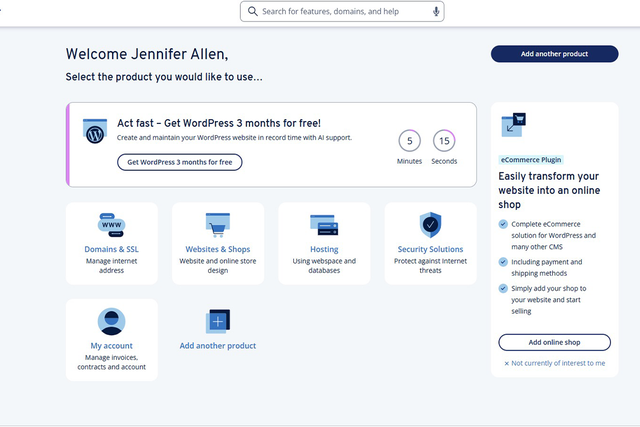
Both Ionos and Hostinger provide some of the most beginner-friendly control panels. Both offer clearly-laid-out options as well as a to-do list when you’re starting out so you know what to prioritise. Setting up a website can be intimidating at first, so these lists are great for ensuring you don’t forget anything essential.
Pursuing similar paths, Ionos and Hostinger both divide things up so it’s easy to see individual packages and also add plans as needed. Both allow you to upload websites via FTP or the provider’s file manager but if you want some guidance, that’s available too.
With Standard web hosting, Ionos provides WordPress, Joomla and other popular services that can be quickly installed. You’ll need to spend time adding themes or customising them but it’s a simple enough process. More importantly, it means the result is truly your own rather than relying on AI-based solutions.
If you’d prefer the guidance, Ionos offers some website builder options for a price. Is it essential? That entirely depends on your creative skills. I did appreciate that it adds on things like GDPR-compliant cookie banners though, which is great for a professional outfit. If you find WordPress confusing or intimidating you can also upgrade to Ionos’s managed WordPress solution so Ionos does all the hard work for you.
Hostinger offers a WordPress-based website builder and its highlight is plugin recommendations that tie into your website aims. There’s also Hostinger Horizons which is an AI solution that has you feeding in prompts to get a fully-made site. It’s smart to make some tweaks to make it more your own, but it’s a good starting point, especially if you have no idea where to begin. It only takes a few minutes to see a completed site using this method.
If you’re also planning on managing a number of domain names, both companies have control panels where you can easily check your domain portfolio alongside your web hosting. It’s these little things that add up quickly. Other general features from both cover all the essentials. There’s free SSL, along with malware scanning, DDoS protection and weekly backups. You also get various tools from both companies that help you check the speed and general performance of your website.
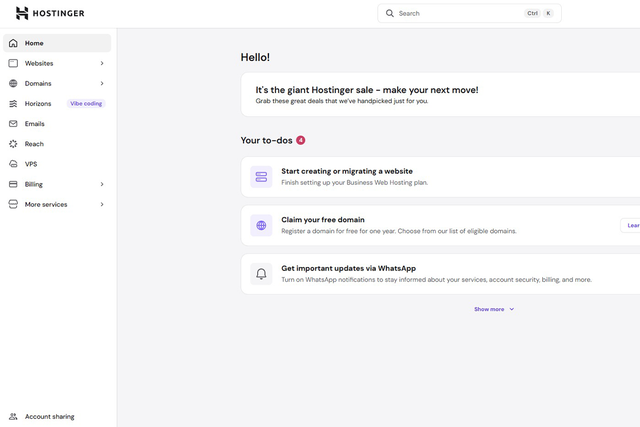
I found both Ionos and Hostinger to be about equal in terms of features. The only truly noticeable difference is it felt like Hostinger was more upfront about costs when you want to upgrade, while Ionos often provided paywalls for certain services when signing up for web hosting. On the plus side, that meant you were never paying for more features than you need.
3. Ionos vs Hostinger: Ease of use
Ionos
- Pros: Visual control panel; hands-off approach with installation
- Cons: Minor issues when logging in (login details aren’t saved automatically)
Hostinger
- Pros: Simple custom control panel; quick to set up site
- Cons: More text-heavy than visual
Simplicity is the word that springs to mind when using either Ionos or Hostinger. They equally take a matter of moments to set up. Creating a WordPress site was an easy direct comparison and both took only a couple of minutes. I liked that Ionos gleefully told me it was fine to close my browser window and I’d receive an email once it was done.
Both control panels make plenty of sense although Ionos did let me down a little bit by not directly linking my WordPress login details to the login page. Combined with my password manager not saving it, I had to reset my password immediately as there was no way of looking on an admin page for my details. That does make it more secure though.
While the Ionos control panel is more visual, Hostinger’s is a little more text-based. Both provide insight into how the hardware is performing and all other key metrics I’d like to check.
4. Ionos vs Hostinger: Support
Ionos
- Pros: Extensive support options available; phone support and callback
- Cons: No AI support
Hostinger
- Pros: Helpful AI support through web browser or WhatsApp as standard
- Cons: No phone support available
Hostinger’s support is great but Ionos has some exceptional options. Dive into Ionos’s Contact Us and you’re given every possible way to be assisted (without someone turning up on your doorstep to solve your query). There are extensive help articles for a bunch of crucial things, which should get to the bottom of most common queries. However, if you need to talk to someone, you have a lot of ways to do so. By picking your type of issue, you’re offered a phone number to call with details of your account number and a temporary phone PIN to get you straight to the point.
Another option is to arrange a callback if that works better for you, or you can start a live chat. There’s also a more typical support ticket route if you prefer to submit your query then come back later for the reply. That’s a nice variety of solutions, as it covers pretty much every way you could likely want to be assisted.
Hostinger is good but with limitations. It has Kodee, an AI bot, which solves the majority of your most commonly asked queries. You can talk to it via your web browser or WhatsApp. It will also lead you to a person if you need to talk to a real customer support agent. However, Hostinger lacks phone support. That may not end up a major issue given its knowledge base is very comprehensive and its AI bot works well. But, if you prefer to talk to someone instantly, it may put you off.
Should you get Ionos or Hostinger?
Ionos and Hostinger are very closely matched. Ionos is a little cheaper and offers better support, but Hostinger offers more ways to create a website without paying extra. Ultimately, I enjoyed using both services and would happily recommend them to anyone. They both provide clear control panels which make everything so much easier, and you always know what’s happening (even if you don’t feel particularly technically minded).
Continuing the trend, both Ionos and Hostinger also make it very easy to add on extra services such as buying up more domain names, signing up for VPS hosting (with n8n and OpenClaw a big deal these days), and even renting a dedicated server for your needs. The process for each is surprisingly similar so they’re both good for more ambitious plans in the future.
As with most endeavours, it’s a good idea to weigh up what’s important to you. I like the flexibility of only having to sign up to Ionos for up to a year, but that may not suit your needs. Similarly, I prefer the many ways in which Hostinger simplifies creating a website, but you might not need that. Both hosts are strong candidates whatever your plans.
How Ionos and Hostinger were tested
I looked at certain criteria while I was testing Hostinger and Ionos. Here’s what I considered each step of the way:
- Ease of use: I wanted to see how easy both Ionos and Hostinger are to use. I looked at it from the perspective of a beginner but also someone with more advanced knowledge and needs. I evaluated the technical language used throughout each process, but I also looked at how easy it was to set up services, cancel my plan, or change things.
- Features: I evaluated whether Ionos and Hostinger offered features that competed with their competitors and were genuinely useful when setting up a website. This included security features, everyday things, and everything in between. I also wanted to see how quickly such features could be implemented if they weren’t already active.
- Value for money: I looked at whether Hostinger and Ionos are good value for money. That also involved looking at pricing plans and determining whether the features were representative of what you get for your money.
- Performance: I wanted to check that doing anything on my hosting control panel was speedily implemented, but also that viewing the resulting website was fast too. No one wants to wait for websites to load slowly, so I also looked at any tools included to speed things up.
Why you can trust our reviews
Jennifer Allen is an expert in tech and websites, and writes gaming and console reviews for IndyBest. She has used a wide range of web hosting services for several years and knows the key features to look for when choosing a provider, from ease of use to value for money.
For more, we’ve rounded up the best website builders
